⏱️ 11 min read
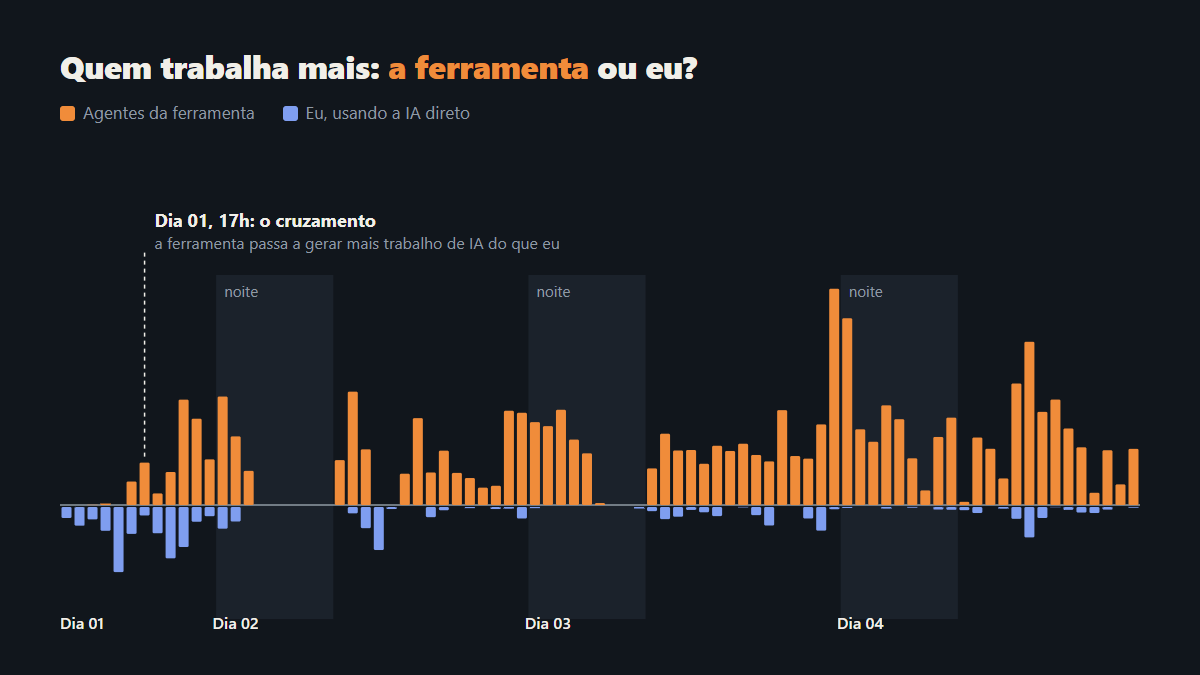
In the first days, the one programming the factory was me, with Claude Code. On Tuesday, that changed. At five in the afternoon, the tool itself started generating more AI work than I did, and the curve never went back.
This chapter is about that turn: what happened that day and what changed in my work after it.
The most intense Tuesday
I sent more than 180 requests in a single day, across about 20 sessions. At some points, I had five copies of the project open at the same time, each with an AI working on a different part.
Almost every session started the same way: "run the app so I can see it". I checked everything, approved everything, decided everything. Each session moved at the speed I could answer. The bottleneck was me.
From a text file to a backlog
In the middle of the afternoon, I opened a session just to jot down ideas in a text file. Fifteen minutes later, the ideas were already registered tasks, and the app got a backlog screen, where each task can be handed to a workflow.
By midnight there were more than 50 tasks, all of them born from a conversation. I described the problem, the AI wrote the task with context and acceptance criteria, and I approved it.
With a backlog, I could stop asking and start delegating.
"I won't abandon you"
At 4:40 pm, the first task was delivered by the tool itself. In the same minute, I wrote to Claude:
"I just wanted to tell you that I won't abandon you. I'll keep using you, only, very soon, I'll start using you inside my own tool."
It answered that it would be fun to watch itself working from the inside. In the same answer, it suggested a supervisor that would follow each run and explain what was happening. That suggestion became a task right then.
5 pm: the crossing
An hour later, the curves crossed. The tool started generating more AI work than I did using AI directly.
That day, it accounted for a little over half of the project's AI messages. The next day, for almost 90%. After that, for more than 90%, every day.
What I started doing
My requests changed in nature. Before, they were "do this", "change that", "run it so I can see it". Then they became:
- "analyze this run";
- "why did it fail?";
- "register this as a task".
I stopped writing code and started doing three things: defining what to build, following what was being built and deciding what went in.
The supervisor that barely worked
Here came a surprise. In almost 50 runs, the tool's supervisor made two decisions. Two.
At the same time, one of my Claude Code sessions got dozens of requests like "follow this run" and "why did it stop?". The supervision work existed, and there was plenty of it. I was just doing it outside the tool, with another AI.
The decision to call the supervisor only when something fails worked for the engine, but it left a gap: nobody followed the runs that were going well. That gap became two tasks: a watch mode and an on-call supervisor. When you let go of the wheel, someone has to watch the road.
Trusting without reading every line
Letting go of the wheel has a cost: I stopped seeing every line of code being born. The question became how to approve a delivery without reading all the code.
The answer was to turn my "run it so I can see it" into part of the workflow. Every task runs in one of two modes:
- Automatic: the task goes from code to merge without stopping. It is for work with no screen: engine, tests, docs, refactoring. It is the night mode.
- Validated: the workflow stops right after development, before review and tests. The approval screen shows screenshots of every changed screen, before and after, side by side. And a button, Run App, opens the new version of the app in one click, so I can try it right away.
Validated stops before review and tests for a practical reason: if the screen is not what I wanted, I find out before paying for the rest of the workflow.
With that, approving stopped being reading code and became looking at the result.
The PO: from a sentence to a task placed in the plan
If I no longer program and no longer follow every run, who organizes the work? That answer came the day after the turn: an AI Product Owner.
Today, I send a short sentence, the way I would talk to someone on the team. The PO works on any project. In a To Do app, for example:
"I want to add a due date to the tasks."
From there, the PO does the triage.
The triage
- Searches the code. It reads the code map and searches for the names the sentence uses. It reads only what it needs, because every file read costs.
- Shows what changes. It points to where the code is today and lists the files that should change, separating production, tests and docs. In the example: the task form, the task card, the API that saves tasks and a new test.
- Measures. It gives a score from 1 to 5 for complexity and another for impact, each with a one-line reason. In the example: complexity 3, because it is four files in two areas, the screen and the API; impact 2, because it helps planning, but you can live without it today.
- Avoids duplicates. It searches for similar tasks. If one already covers the request, it suggests adding to it instead of creating another.
- Checks clarity. It gives a score from 0 to 100%. Every gap becomes a question, and the task only goes on the roadmap at 85% or more. In the example, it did not say whether the date is required. The PO assumes it is optional and records the question.
- Estimates from data. Time and effort are not an AI guess. The app itself calculates them from past runs of similar complexity and says how many runs it was based on.
In the end, the task comes out written with context, acceptance criteria and one piece of advice: run it alone or together with another. Nothing is saved without my click.
Placing it on the roadmap
After the triage, the PO places the task on the roadmap, next to everything already planned. The criteria:
- Groups what belongs together. Tasks that touch the same files, the same feature, or where one uses what the other creates run in the same run. With a size limit: a group that was too big once blew a run's memory.
- Separates what would clash. Tasks that edit the same files go to different stages, with the reason written down. A large refactor runs alone. And history counts: a file that conflicted once will conflict again.
- Reads the dependencies inside the tasks. Comparing files is not enough. If a task needs a screen that another one is still going to create, it goes after it. This criterion came from runs that stopped because they needed something another run was still doing.
- Builds stages with as much parallelism as possible. Everything that does not conflict goes into the same stage, to keep waiting to a minimum and runs going day and night.
- Picks the mode of each group. Validated for what you can see on screen, Automatic for the rest, always with a one-line reason.
- Splits what is too big. A very complex task becomes two to four smaller ones, each with a part that can ship on its own.
In the example, the PO found another open task that touched the same card: showing the task's priority. It put both in the same group, in Validated mode ("it is a screen: look before paying for review and tests"), in the first stage where nothing else touched that screen. A third task, exporting tasks as CSV, changed the same API and went to the next stage, with the reason: "edits the same file".
Calibrating the PO
The PO does not decide on its own how much risk and how much cost to accept. I calibrate that with two five-step controls.
Speed or quality. Sets the pace of the roadmap:
- Parallel runs per stage: at the speed end, every run that shares no file; in the middle, three; at the quality end, two.
- Maximum group size: bigger on speed, smaller on quality.
- When the workflow stops for me to look: on speed, only new screens run in Validated; on quality, any screen change.
- Where the task goes: in the first free stage, or after the most stable work it depends on.
Economy or generosity. Sets how much each run spends:
- Grouping: on economy, tasks from the same area run together, to pay the fixed cost of review, tests and build only once.
- Tests: run only the existing ones, or write and run new tests. At maximum economy, tests run in a batch, in a stage of their own.
- Evidence: no screenshots, only of the screens that changed, or of all of them.
- Agents: cheaper models where the workflow allows.
When the two controls ask for different group sizes, the cost one wins. And I can ask for an exception for a single task, without changing the calibration: "plan this one on economy".
The roadmap that refills itself
With the living roadmap on, when the last stage ends, the app asks the PO for the next ready tasks, the smallest first, and keeps going. It stops when nothing ready is left or when the day's budget runs out. And it never answers an approval that is mine.
Where it still gets things wrong
- It predicts files by text search. When code is reached through indirect paths, it misses.
- It trusts its own complexity score. A badly measured group only shows up when the run blows up.
- Dependencies nobody wrote down still stop runs in parallel.
- Large tasks stay off the living roadmap until someone splits them.
What changed for me
I became a PM. I decide what goes in and approve with one click. The PO decides how and when. Planning, which used to be the part I did in my head between one session and the next, became a step of the workflow, with written criteria and a reason for every decision.
The rule that stayed
Letting go of the wheel is not letting go of the car. All along the way, one rule did not change: automation never crosses a human approval. Not the supervisor, not the PO, not the living roadmap. They propose, organize and execute. I am the one who approves.
The next step
If AI was already driving during the day, the next step was letting it drive at night. In the next chapter, I went to sleep and woke up to the work done (chapter 3), I tell the first night hour by hour: the roadmap running in two lanes, the ten tasks delivered and what I found in the morning.